K16-Max
16 eFused pixel ports with per-port current monitoring, 8 two-way differential ports, audio and 2 DMX.
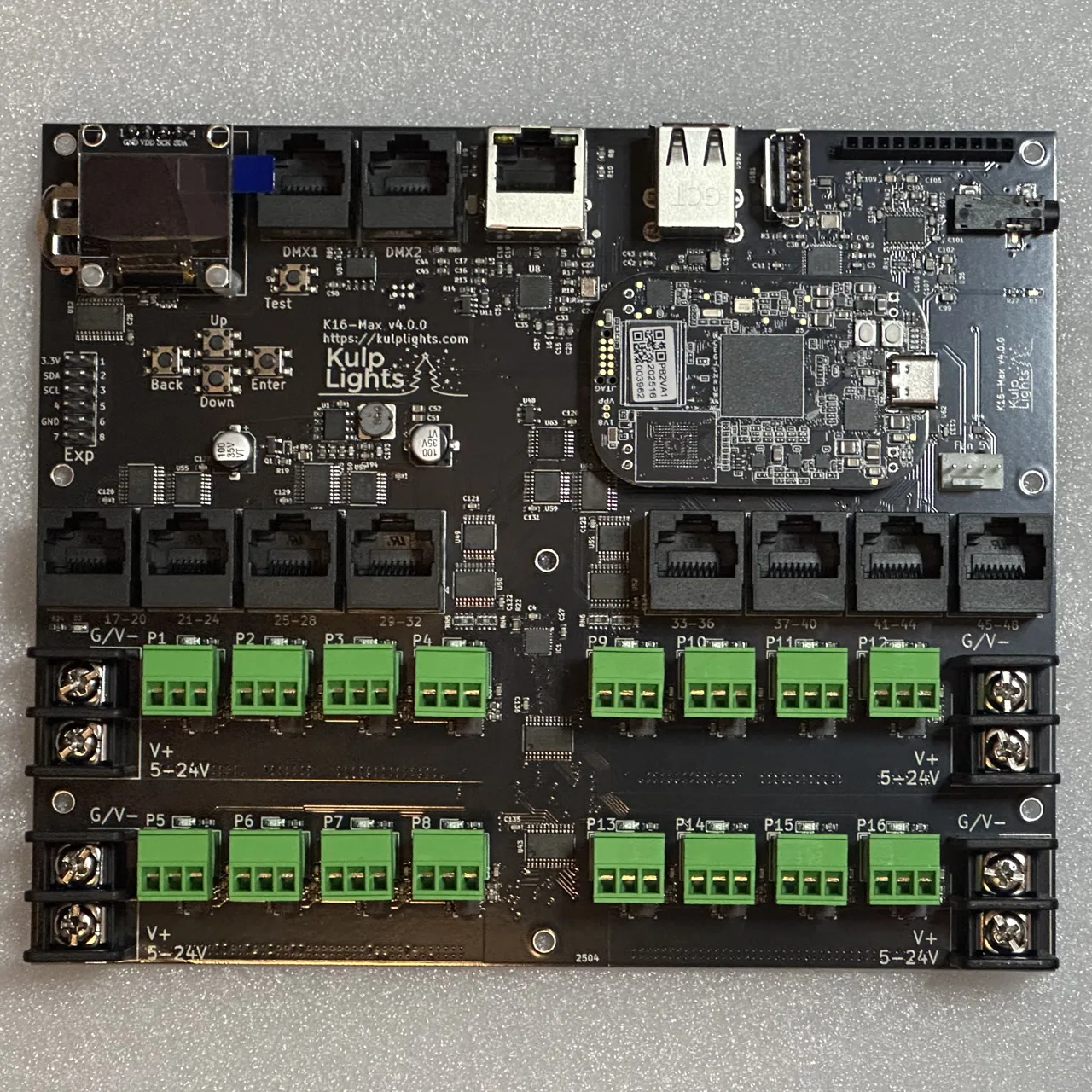
K16-Max with a PocketBeagle 2 fitted. Photos may show an earlier board revision.
This page describes revision v4.1.0 (printed on the board as K16-Max v4.1.0). Differences in earlier revisions are listed under Board revisions.
Specifications
| K16-Max | |
|---|---|
| Local pixel ports | 16 (P1–P16), 3-pin 3.5 mm pluggable, plugs included |
| Port protection | eFuse per port, about 6 A, latching |
| Power switching | per port (FPP-controlled) |
| Current monitoring | every local port, plus Falcon V5 receivers |
| Differential ports | 8 × RJ45 = 32 strings (17–48), two-way (pair 1/2) |
| Total strings | 48 |
| Power inputs | 4 terminals rated 30 A, 5–24 V DC, one bank of 4 ports each |
| DMX / serial | 2 (DMX1, DMX2), RS-485 transmit |
| Audio | PCM5102A DAC, 3.5 mm line out, FM transmitter socket |
| Ethernet | 1 × Gigabit (USB-attached) |
| USB-A | 3 |
| Display & buttons | 128×64 OLED, Up / Down / Enter / Back / Test |
| Real-time clock | yes, CR1220 backup cell |
| Fan header | 5 V 4-pin PWM, temperature-controlled; speed monitoring on v4.1 and later |
| Expansion header | 2×6: I²C + 8 GPIO (Exp.1–Exp.8) |
| Size | 168.6 × 139.2 mm (6.64 × 5.48 in), 8 mounting holes, 3.0 mm |
| Requires | PocketBeagle 2 (not PocketBeagle 1), FPP 9.0 or later |
Board map
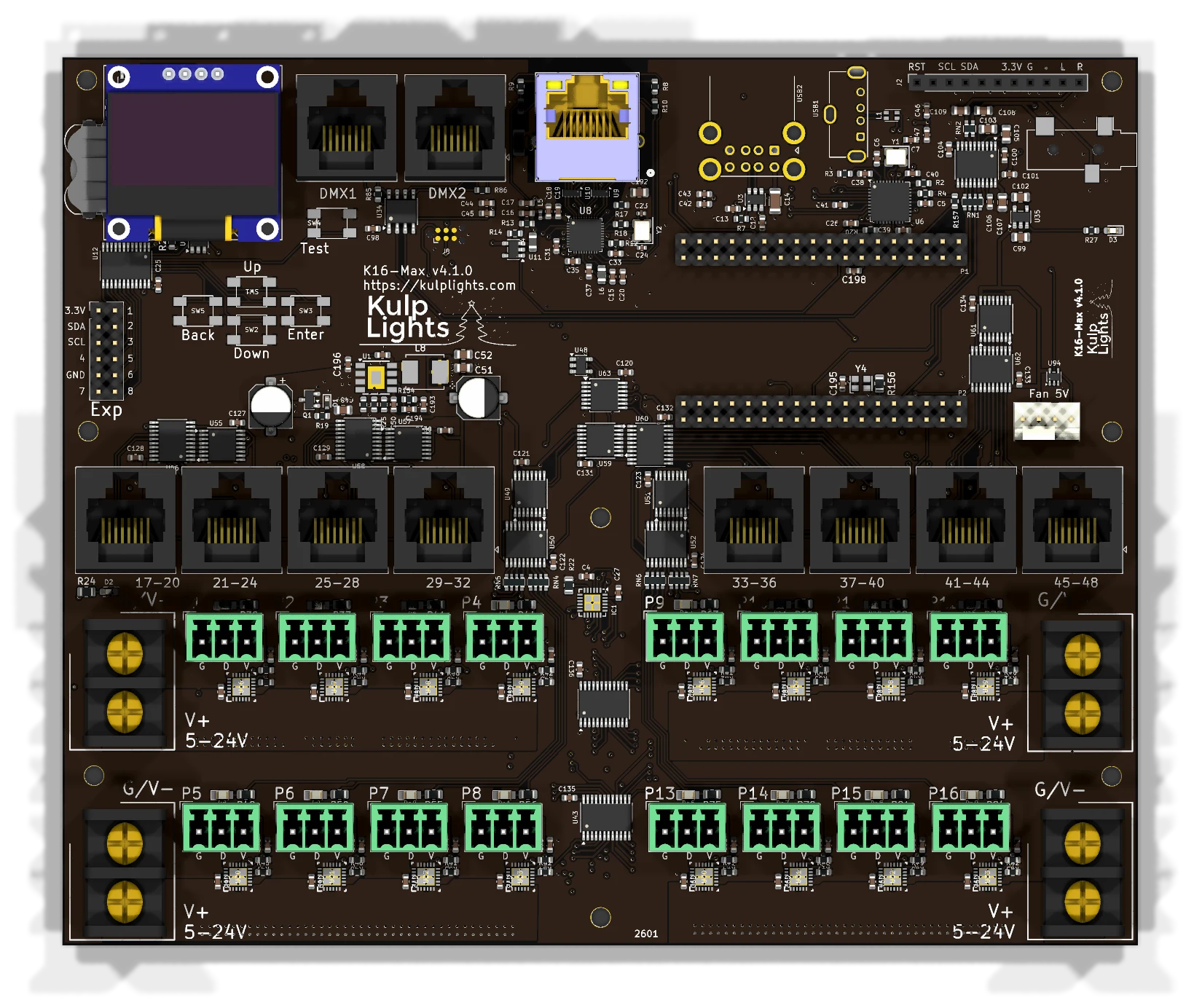
Power terminals
| Terminal | Position | Feeds | FPP reading | Also powers the controller? |
|---|---|---|---|---|
| V1 | left side, upper | P1–P4 | VIN1 | yes |
| V2 | left side, lower | P5–P8 | VIN2 | no |
| V3 | right side, upper | P9–P12 | VIN3 | no |
| V4 | right side, lower | P13–P16 | VIN4 | no |
The blue LED beside V1 lights when it has power. V1 must be powered for the controller to boot.
See Power for supply sizing, wire size and safety.
Pixel ports
The sixteen pixel ports are in two rows, eight on each side of the board's centre line:
| Left half | Right half | |
|---|---|---|
| Top row | P1 P2 P3 P4 | P9 P10 P11 P12 |
| Bottom row | P5 P6 P7 P8 | P13 P14 P15 P16 |
Each port is G D V (ground, data, +V), as printed beside it. See Pixel outputs.
eFuses and current monitoring
Every local port has its own eFuse (about 6 A), and FPP reads every port's current. FPP turns each port on and off as needed. A tripped port shows a red icon on Status/Control → Port Status; click it to reset the port once the fault is fixed. See Power → eFuses and Current monitoring.
Differential ports
17-20 · 21-24 · 25-28 · 29-32 · 33-36 · 37-40 · 41-44 · 45-48
Each jack carries four strings, numbered as printed above it. They are two-way: Falcon V5 smart receivers report their eFuse status and current back over pair 1/2. Other receivers work as send-only. See Differential ports.
Other connectors
| Connector | Marking | Details |
|---|---|---|
| Ethernet | (RJ45 with LEDs) | Network |
| DMX | DMX1, DMX2 |
DMX / serial |
| USB-A | — | 3 ports, USB |
| OLED | GND 3.3V SCL SDA |
Controls & display |
| Audio out | 3.5 mm jack | Audio |
| FM transmitter | RST SCL SDA 3.3V G L R |
Audio |
| Fan | Fan 5V |
Fan |
| Expansion | Exp |
Expansion header |
| RTC battery | coin-cell holder | Clock |
FPP setup
When FPP detects the K16-Max it sets itself up automatically. It enables the K16-Max pixel-string layout, the sensors (input voltages, port currents, temperature), the audio output and a disabled DMX output. Out of the box each local port is set to 50 WS2811 pixels at 50 % brightness. Set the real counts and start channels from xLights or the FPP Pixel Strings page. See Configuring outputs.
Board revisions
The revision is printed on the board next to the model name. FPP also shows it as the Hardware Version under Help → About → Cape Info.
| Revision | Changes |
|---|---|
| v4.0 | eFused ports with current monitoring. Fan speed control. |
| v4.1 | Adds fan speed monitoring. |
Dimensions & mounting
- 168.55 × 139.21 mm (6.64 × 5.48 in), 8 plated mounting holes, 3.0 mm, for M2.5 (or #4) screws and standoffs.
- The mounting holes are connected to ground.
- Use nylon or metal standoffs at least 6 mm (¼ in) tall, so nothing on the underside touches the enclosure.
- Mounting drawing: PDF. It is shared by the K16, K16-Pro and K16-Max, which have the same outline and holes.
- A 3D-printable mount is on Thingiverse.