K8-PB
A compact controller: 8 eFused pixel ports with per-port current monitoring, 3 differential ports and an expansion port for 16 more strings: 36 strings in all, on a 74 × 97 mm board.
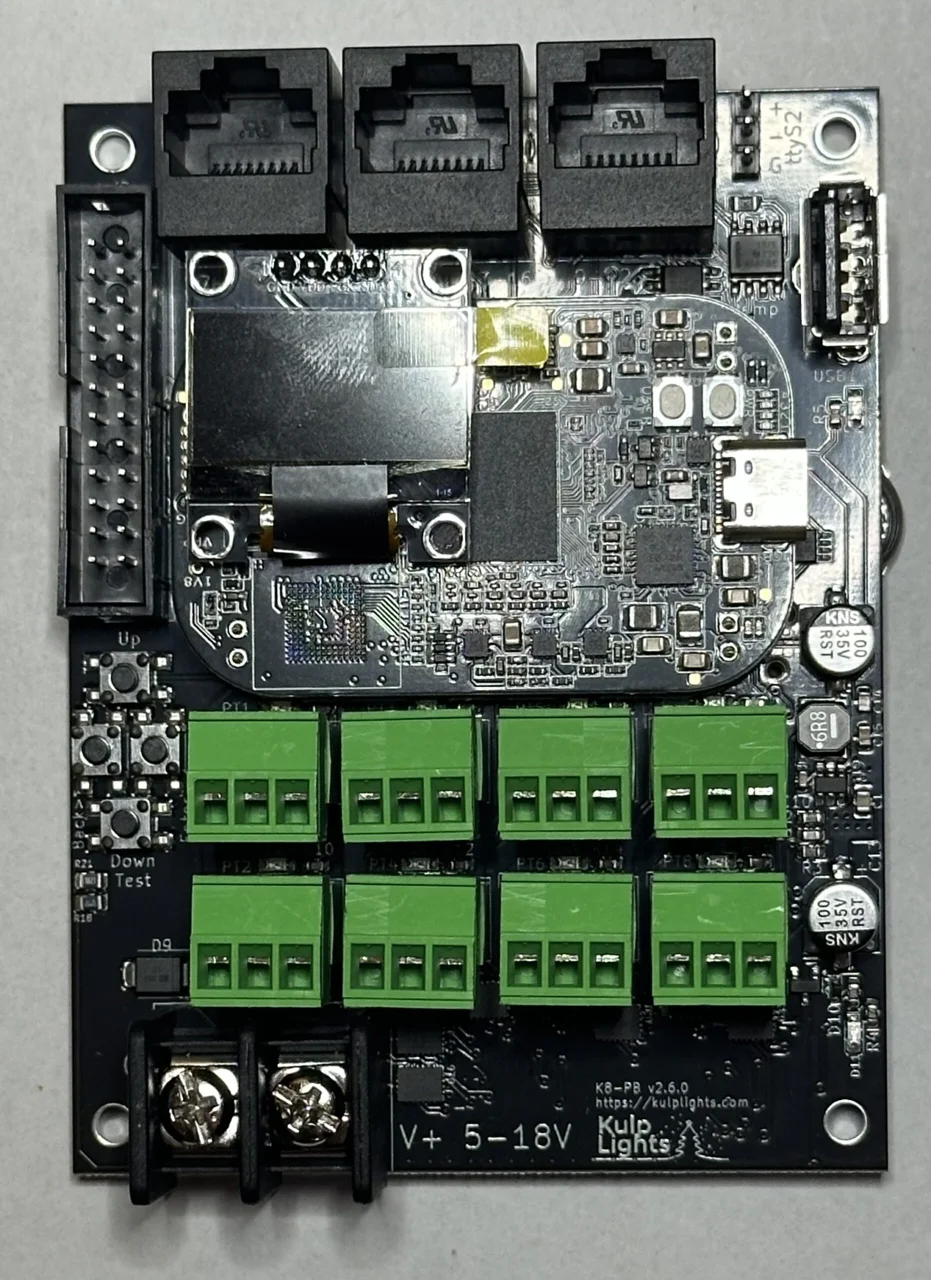
K8-PB with a PocketBeagle 2 fitted.
This page describes revision v2.6.0 (printed on the board as K8-PB v2.6.0). The
PocketBeagle 2 K8-PBs are v2.5 and v2.6; see Board revisions for the
one difference.
How the K8-PB differs from the other boards
- No Ethernet on the board. Plug a USB Ethernet adapter or an FPP-supported USB Wi-Fi adapter into its USB-A port. You need one of them to set it up.
- One power terminal, 5–18 V. It powers the controller and all eight ports, so all of them run at the same voltage. Don't use 24 V supplies.
- DMX is a 3-pin header, not an RJ45 jack.
- The expansion port drives 16 more strings through a Falcon F16v4-style expansion board.
- The differential ports are send-only. FPP drives this board with its BBB48String output, which doesn't support Falcon V5 smart receivers (V4 and earlier work).
Specifications
| K8-PB | |
|---|---|
| Local pixel ports | 8 (PT1–PT8), 3-pin 3.5 mm pluggable, plugs included |
| Port protection | eFuse per port, about 5.2 A |
| Power switching | per port (FPP-controlled) |
| Current monitoring | every local port |
| Differential ports | 3 × RJ45 = 12 strings (9–20), send-only |
| Expansion port | 24-pin (2×12) header, 16 strings (21–36), for a Falcon F16v4-style expansion board |
| Total strings | 36 |
| Power input | 1 terminal, 5–18 V DC, powers the controller and all 8 ports |
| DMX / serial | 1, RS-485 transmit, 3-pin 2.54 mm header (ttyS2). Needs FPP 10.3 or later. |
| Audio | none built in. Use a USB sound card. |
| Ethernet | none. Use a USB Ethernet or Wi-Fi adapter. |
| USB-A | 1 |
| Display & buttons | 128×64 OLED, Up / Enter / Back / Down-Test |
| Real-time clock | yes, CR1220 backup cell |
| Temperature sensor | yes |
| Fan header | none |
| Size | 73.7 × 97.2 mm (2.90 × 3.83 in), 4 mounting holes, 3.2 mm |
| Requires | PocketBeagle 2. The PocketBeagle 2 K8-PB does not work with a PocketBeagle 1. |
Board map
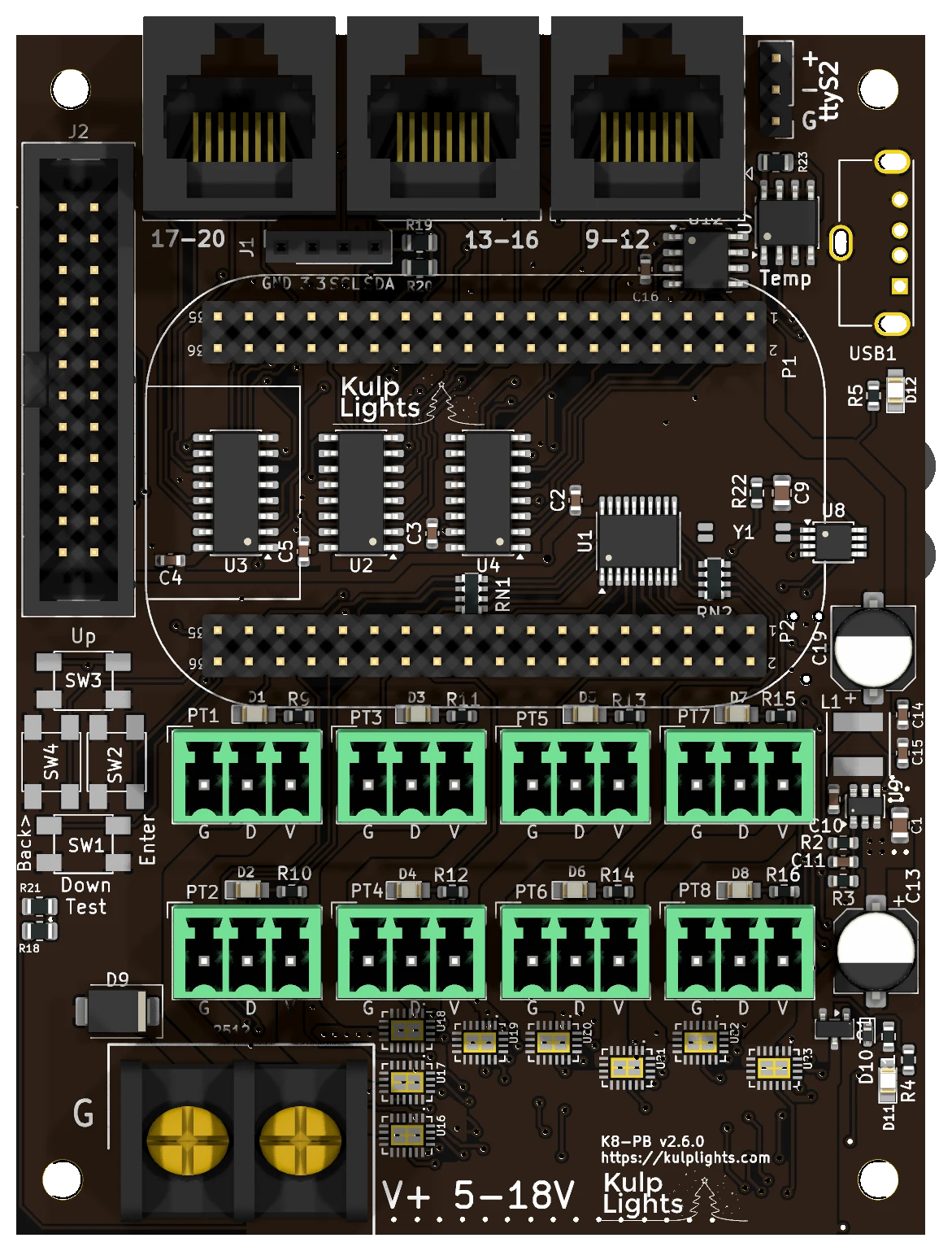
Power terminal
The K8-PB has one power terminal, at the bottom left, marked G (left screw) and V+ 5-18V (right screw). It powers the PocketBeagle 2, the USB port and all of the logic, and every pixel port. FPP shows its voltage as VIN.
- Because every port shares this supply, all eight local strings must be the same voltage: 5 V or 12 V pixels. To mix voltages, put the other strings on differential receivers, which power their strings from their own supply.
- 18 V is the maximum. A 24 V supply will damage the board.
- The terminal is rated 32 A. With eight ports that can each draw up to about 5 A, add up your real loads and keep the total under that. Use 10 AWG wire for heavily loaded boards.
- Two blue LEDs on the right-hand edge show power: the lower one lights when the terminal has power, and the upper one (beside the USB port) when the internal 5 V supply is running.
Check polarity before you power up
Unlike the K8, K16 and K32 boards, the K8-PB is not protected against a reversed supply. The controller's own logic is protected, but a supply wired backwards drives the input surge-protection diode, which is likely to burn out. It usually fails as a short, and the board then won't power up until it is repaired. Check that V+ goes to the right-hand screw and G to the left before you switch on.
See Power for supply sizing and safety.
Pixel ports
The eight pixel ports are in two rows across the lower half of the board:
| Top row | PT1 | PT3 | PT5 | PT7 |
| Bottom row | PT2 | PT4 | PT6 | PT8 |
Each port is G D V (ground, data, +V), as printed beneath it. PT1 is FPP port 1, and so on. See Pixel outputs.
eFuses and current monitoring
Every local port has its own eFuse, which trips at about 5.2 A, and FPP reads every port's current. As on the Max boards, FPP turns each port on and off as needed. When an eFuse trips, FPP switches the port off and marks it with a red icon on Status/Control → Port Status. Click the icon to turn the port back on once the fault is fixed. See Current monitoring.
Differential ports
17-20 · 13-16 · 9-12, from left to right along the top edge.
Each jack carries four strings, numbered as printed below it. Note that the numbering runs
right to left: the jack nearest the USB port is 9-12. The ports are send-only. Any
standard differential receiver works, and smart receivers work in v1, v2 or V4 mode. See
Differential ports.
Expansion port (strings 21–36)
The 24-pin, 2×12 shrouded header on the left edge carries 16 more pixel data lines. It is compatible with Falcon F16v4 expansion boards, which turn the 16 lines into pixel ports with their own power.
| Pin | Signal | PocketBeagle pin | Pin | Signal | PocketBeagle pin |
|---|---|---|---|---|---|
| 1 | GND | — | 2 | GND | — |
| 3 | +5 V | — | 4 | +5 V | — |
| 5 | String 21 | P1-35 | 6 | String 22 | P1-34 |
| 7 | String 23 | P1-32 | 8 | String 24 | P1-30 |
| 9 | String 25 | P2-20 | 10 | String 26 | P2-35 |
| 11 | String 27 | P1-20 | 12 | String 28 | P1-12 |
| 13 | String 29 | P1-08 | 14 | String 30 | P1-06 |
| 15 | String 31 | P1-04 | 16 | String 32 | P2-17 |
| 17 | String 33 | P1-02 | 18 | String 34 | P2-07 |
| 19 | String 35 | P2-05 | 20 | String 36 | P2-03 |
| 21 | — | — | 22 | GND | — |
| 23 | — | — | 24 | — | — |
Pin 1 is at the top of the header, on the outer (board-edge) row.
Using the expansion lines as GPIO
Each data line is wired straight to the PocketBeagle pin shown, so you can use the header for GPIO inputs such as push buttons instead of pixels. FPP only takes over a line when its string has pixels configured, and strings 21–36 have none by default. Leave a string at 0 pixels (and with no smart receiver on it) and its pin is free for FPP's GPIO Inputs, where it appears under the PocketBeagle pin name. The lines are 3.3 V only: wire buttons to switch the pin to GND, choose the pull-up mode for the input in FPP, and never connect anything above 3.3 V.
Not for pixels directly
The data lines on this header come straight from the PocketBeagle 2 at 3.3 V, with no buffering or protection. Always go through an expansion board. Never wire pixels straight to the header.
DMX
DMX is on the 3-pin, 2.54 mm header at the top right, above the USB port, marked ttyS2:
| Pin | Marking | Signal | DMX XLR pin |
|---|---|---|---|
| top | + |
Data + | 3 |
| middle | - |
Data − | 2 |
| bottom | G |
Ground | 1 |
Make up a cable from a 3-pin socket to an XLR or RJ45 DMX connector, wired as above. The output
is transmit-only. FPP calls the port ttyS2. See DMX / serial.
DMX needs FPP 10.3 or later
On the PocketBeagle 2 the DMX header's pin has no UART transmit, so FPP sends DMX from one of the PocketBeagle's PRUs instead. That arrived in FPP 10.3. With an earlier FPP the DMX output doesn't work; everything else does.
Other connectors
| Connector | Marking | Details |
|---|---|---|
| USB-A | — | 1 port, for the network adapter. USB |
| OLED | GND 3.3V SCL SDA |
Controls & display |
| Buttons | Up Enter Back> Down Test |
Down and Test share one button. Controls & display |
| RTC battery | coin-cell holder | Clock |
FPP setup
When FPP detects the K8-PB it sets itself up automatically. It enables the K8-PB
pixel-string layout (FPP's BBB48String output, with all 36 strings), the voltage and current
sensors, and a disabled DMX output on ttyS2. Set the pixel counts and start channels from
xLights or the FPP Pixel Strings page. See Configuring outputs.
For the first setup, plug in a USB Ethernet adapter and connect it to your network, or use a USB Wi-Fi adapter and FPP's Wi-Fi hotspot.
Board revisions
The revision is printed on the board next to the model name. FPP also shows it as the Hardware Version under Help → About → Cape Info.
| Revision | Changes |
|---|---|
| v2.5 | First PocketBeagle 2 version. Port 2's enable is wired always-on, so FPP can't switch port 2 off. Its eFuse still trips and FPP still warns, but the port retries about every half second instead of staying off, and keeps tripping until the fault is fixed. Everything else works normally. This batch was sold at a discount as the K8-PB "Almost". |
| v2.6 | Port 2 fixed: all eight ports switch and stay off when tripped. |
Older K8-PBs made for the original PocketBeagle (PocketBeagle 1) aren't covered by this manual.
Dimensions & mounting
- 73.66 × 97.16 mm (2.90 × 3.83 in), 4 plated mounting holes, 3.2 mm, for M3 (or #4) screws and standoffs.
- Use nylon or metal standoffs at least 6 mm (¼ in) tall, so nothing on the underside touches the enclosure.